



How to Choose the Right ATS for Your Hiring Team

Most hiring teams don’t fail at recruitment because they lack talent. They fail because their processes can’t scale. An applicant tracking system (ATS) is the infrastructure that determines whether your hiring pipeline runs smoothly or collapses under volume. Get the selection decision right and your recruiters gain hours back every week. Get it wrong and you’re stuck in a contract with software nobody uses.
An applicant tracking system is software that manages the full recruitment pipeline, from job posting through to offer, by centralizing candidate data, automating repetitive tasks, and giving hiring managers structured visibility across every open role. But not every ATS does this equally well, and the gap between a good fit and a bad one is significant: organizations that choose their ATS based on a structured evaluation process are 2.3 times more likely to report strong recruiter adoption versus those that choose based on vendor demos alone, according to Aptitude Research’s ATS Implementation and Adoption Study.
This guide is for HR leaders, talent acquisition managers, and operations teams evaluating an ATS for the first time, switching platforms, or trying to figure out why their current one isn’t delivering. You’ll get a practical decision framework, a clear set of evaluation criteria, and the implementation steps that determine whether your ATS investment pays off.
Key Takeaways
- An applicant tracking system centralizes your entire hiring pipeline, but adoption depends on selecting software that matches your team’s actual workflow, not just your wishlist.
- Hiring volume, integration requirements, and compliance needs are the three highest-stakes criteria in any ATS evaluation — define them before looking at vendors.
- The average ATS implementation takes 6–12 weeks; teams that skip structured onboarding see adoption rates drop below 50% within the first six months.
- A well-implemented ATS reduces time-to-hire by an average of 40% and cuts cost-per-hire by 20–30%, according to LinkedIn Talent Solutions benchmarks.
- The three most common ATS failure modes are over-buying features you won’t use, under-investing in onboarding, and ignoring integration compatibility during procurement.
- Run a structured pilot on a real open role before signing any annual contract — it’s the single most reliable way to surface deal-breaker gaps before they cost you money.
What Is an Applicant Tracking System?
An applicant tracking system (ATS) is software that manages and automates the end-to-end recruitment process, from publishing job postings through to offer letter, by centralizing candidate data and giving every stakeholder a structured view of the pipeline.
At its core, an ATS replaces the spreadsheets, email threads, and shared drives that most teams use to track candidates. Every application flows into a single pipeline. Recruiters can see where each candidate sits, what feedback has been collected, and what the next action is, without chasing updates across Slack channels or inboxes.
Modern applicant tracking systems do considerably more than track. Most platforms now include job distribution to multiple boards, automated screening questionnaires, interview scheduling, structured feedback collection, offer management, and reporting dashboards. Higher-end platforms add AI-driven candidate ranking, skills matching, and predictive analytics.
As of 2024, over 97% of Fortune 500 companies use an ATS, and adoption is accelerating among mid-market businesses with 50–500 employees, where hiring complexity typically outgrows spreadsheet-based tracking within 12–18 months of growth, according to Gartner’s HR Technology Market Guide for Recruiting.
Why Your ATS Choice Matters More Than You Think
The wrong ATS doesn’t just waste money — it actively slows your hiring by creating process friction that recruiters route around, leading to inconsistent data, compliance gaps, and decisions made without reliable information.
Hiring teams that switch ATS platforms mid-growth cycle lose, on average, four to six weeks of productivity during migration. That’s not a technology problem. That’s a decision problem that could have been avoided with a more deliberate selection process upfront.
The stakes are particularly high for fast-scaling businesses. When a team is hiring five roles per quarter, a clunky ATS is an inconvenience. When that same team is hiring 50, it’s a bottleneck that delays every function waiting on headcount.
Compliance risk is the factor most teams underestimate. In many jurisdictions, employment law requires that candidate data be retained for specific periods, that equal opportunity records be maintained, and that selection criteria be documented and defensible. The U.S. Equal Employment Opportunity Commission (EEOC) outlines clear obligations for hiring technology and candidate data retention — an ATS that doesn’t support structured data retention and reporting puts the organization at legal risk, particularly in regulated industries.
📊 Key Stat: Organizations using a purpose-fit ATS report a 40% reduction in time-to-hire and a 28% drop in cost-per-hire compared to those using generic tools or spreadsheets. Source: LinkedIn Talent Solutions Benchmark Report.
Key Benefits of the Right ATS
A well-matched ATS reduces recruiter admin work, speeds up hiring, improves candidate experience, and gives leadership the data they need to make resourcing decisions with confidence.
Centralized candidate data. Every application, note, interview score, and communication lives in one place. Recruiters stop hunting across inboxes and shared folders. A role that previously required 6–8 tools to manage can be run entirely from the ATS dashboard.
Faster time-to-fill. Automated job syndication, screening questionnaires, and interview scheduling cut days out of every hiring cycle. Teams using structured ATS workflows fill roles 20–35% faster than those managing the process manually.
Structured decision-making. Scorecards, standardized feedback forms, and approval workflows mean every hiring decision is documented and consistent. Structured interviews are 1.5x more predictive of job performance than unstructured ones, and an ATS makes structured interviews the default rather than the exception.
Improved candidate experience. Candidates who receive timely updates and clear next steps are significantly more likely to complete the process and accept offers. ATS platforms with built-in communication automation reduce candidate drop-off by 15–25% on average.
Compliance and audit readiness. The right ATS maintains retention-ready records, tracks equal opportunity data, and generates reports that satisfy U.S. Equal Employment Opportunity Commission (EEOC) and similar regulatory requirements without manual effort. According to SHRM’s research on ATS adoption rates and recruiter productivity, organizations with compliant, well-configured ATS workflows spend significantly less time on audit preparation.
Reporting and accountability. Hiring leaders can see pipeline health, recruiter performance, source quality, and offer acceptance rates across every role, in real time. This is the data needed to make resourcing decisions, justify headcount spend, and identify process failures before they become costly. If you’re building the business case for an ATS investment, see our guide on ATS ROI: How to Calculate the Business Case for a step-by-step framework.
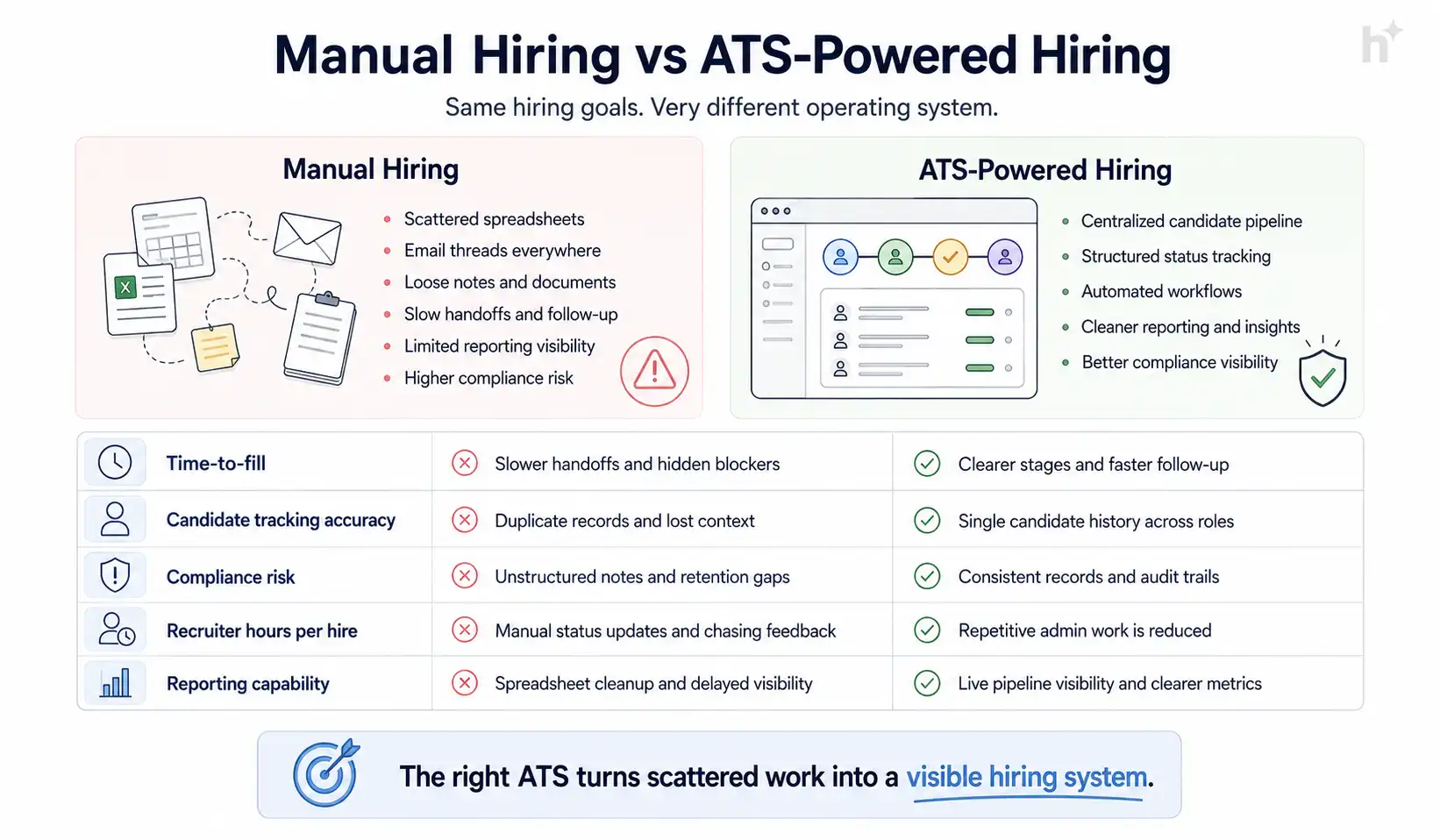
| Dimension | Manual / Spreadsheet Hiring | ATS-Powered Hiring |
|---|---|---|
| Time-to-fill (average) | 42 days | 25–30 days |
| Candidate tracking accuracy | Variable, error-prone | Centralized, auditable |
| Compliance documentation | Ad hoc, inconsistent | Structured, automated |
| Recruiter hours per hire | 12–18 hours | 6–10 hours |
| Real-time pipeline visibility | None | Full dashboard reporting |
| Data available for decisions | Fragmented | Consolidated and exportable |
💡 Pro Tip: Don’t evaluate ATS platforms on features alone. Evaluate them on how many of those features your team will actually use in the first 90 days. Unused features don’t generate ROI — they generate confusion.
How to Evaluate and Select an ATS
Choosing the right applicant tracking system is a five-stage process: define your requirements, map your integrations, shortlist vendors, run a structured pilot, and calculate ROI before committing to a contract.
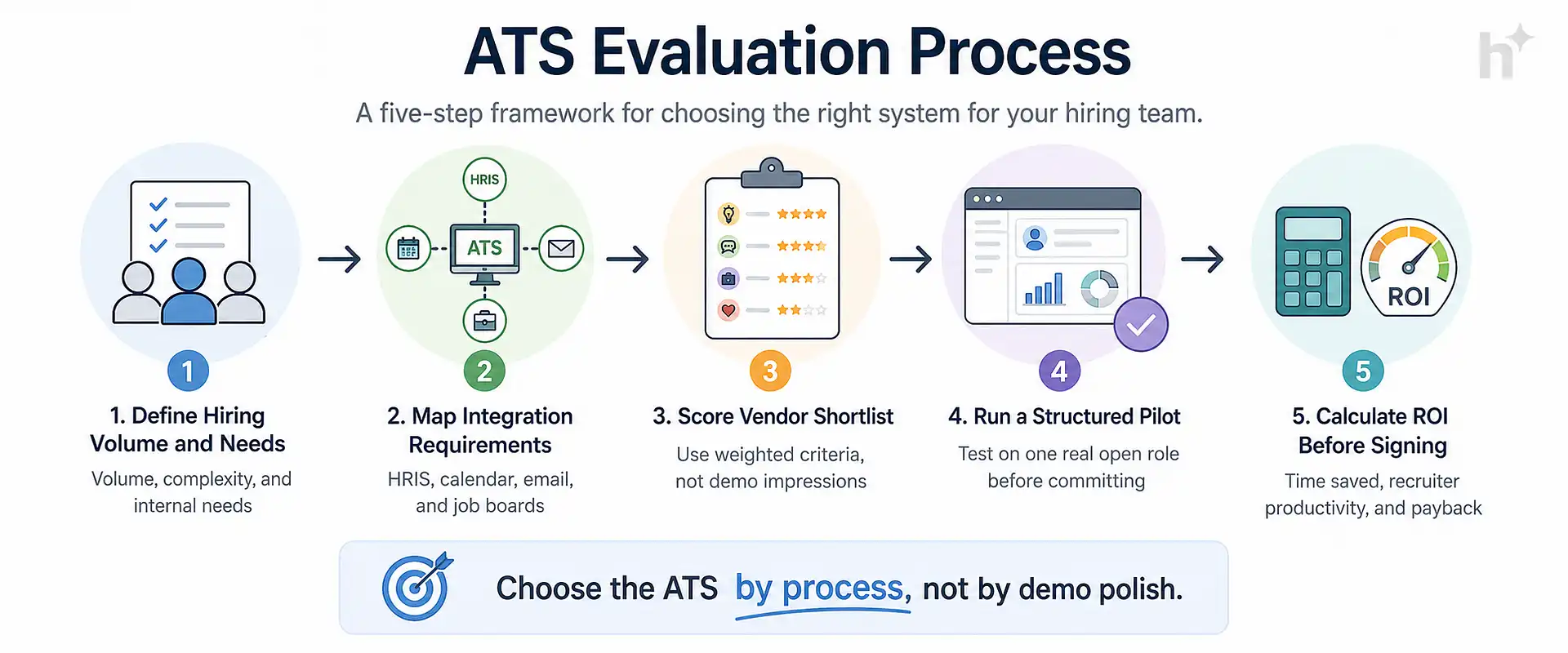
Stage 1: Define Your Requirements
Input: Your current hiring volume, team size, open role types, and known process pain points.
Process: Run a structured requirements workshop with your recruiting team, HR operations, and at least one hiring manager. Document the 10–15 workflow steps that happen for every role and identify where the friction is. Separate your must-haves from your nice-to-haves before you talk to any vendor. Our ATS Buyer’s Guide: What Features Actually Matter walks through the full feature evaluation checklist so you can build this list with confidence.
Output: A prioritized requirements document that drives every subsequent evaluation decision. Without this, vendor demos will dazzle you with features you’ll never use.
Stage 2: Map Your Integration Requirements
Input: Your existing HR tech stack — HRIS, payroll, background screening, video interview tools, and any productivity tools your recruiters use daily.
Process: List every system the ATS needs to pass data to or receive data from. Identify whether native integrations exist or whether you’ll need middleware. A missing integration isn’t automatically a deal-breaker, but an undocumented one discovered post-contract is. For a full breakdown of which integrations matter most and why, see our guide on ATS Integrations: What to Connect and Why.
Output: An integration map that you present to every vendor during evaluation. Their response tells you as much about their technical support quality as their product documentation does.
Stage 3: Score Your Vendor Shortlist
Input: Your requirements document and integration map.
Process: Limit your shortlist to three to five vendors. Evaluate each against the same criteria using a weighted scoring matrix: core functionality (30%), ease of use (20%), integration compatibility (20%), reporting capability (15%), vendor support quality (10%), and pricing transparency (5%).
Output: A scored comparison that removes subjectivity from the decision. If two vendors are within five points of each other, run a pilot on both.
| Condition | Recommended Action | Expected Outcome |
|---|---|---|
| High-volume roles (100+ applications/month) | Prioritize automated screening and bulk pipeline tools | 50–60% reduction in first-pass review time |
| Niche technical roles (under 15 applications/month) | Prioritize sourcing integrations and structured feedback | Better signal, fewer wasted interview slots |
| Multi-site or multi-country hiring | Prioritize compliance reporting and localization support | Reduced legal exposure, consistent process across regions |
| Small team (1–3 recruiters) | Prioritize ease of setup and self-service configuration | Faster adoption, lower implementation overhead |
| Rapid scaling (2x+ headcount in 12 months) | Prioritize scalability and workflow customization | Platform that grows with you, not against you |
Stage 4: Run a Structured Pilot
Input: One real open role and your top two vendors.
Process: Use each platform to manage the role from posting through to first-round interviews. Track how long it takes to post the job, how candidate data flows in, how feedback is collected, and where friction appears. Give your recruiter and at least one hiring manager a structured survey at the end.
Output: Direct experience that no sales demo can replicate. Real friction surfaces in the first week of a pilot. Do not skip this step.
Stage 5: Calculate ROI Before Signing
Input: Your current cost-per-hire, time-to-fill, and recruiter hours per hire.
Process: Use vendor benchmarks and your pilot data to project the improvement. Factor in implementation time (typically 6–12 weeks for mid-market platforms), migration costs, and training overhead. A platform that saves 15 recruiter hours per hire across 60 annual hires delivers 900 hours of recovered capacity per year. For a complete methodology, our ATS ROI: How to Calculate the Business Case guide provides a ready-to-use model you can populate with your own numbers.
Output: A business case that justifies the investment and sets the baseline you’ll use to measure success post-implementation.
Best Practices for ATS Implementation
The most impactful single practice is assigning a dedicated implementation owner before the contract is signed — not after — because the transition period is where most ATS projects lose momentum and adoption rates drop.
Define your pipeline stages before configuration begins. Before your ATS is even set up, document your standard hiring stages across every role type. Most platforms let you customize stages, and if you configure them based on vendor defaults rather than your actual process, you’ll spend months fixing a structure that never fit. Our ATS Implementation: A Step-by-Step Guide covers stage mapping, configuration sequencing, and go-live checklists in full detail.
- Before: Teams configured the ATS using default stages (Applied, Screened, Interviewed, Offered) that didn’t reflect their actual workflow, forcing recruiters to improvise and track progress outside the system.
- After: Teams that mapped stages to their real workflow before configuration report recruiter adoption rates above 85% within the first 60 days, according to Aptitude Research’s ATS Implementation and Adoption Study.
Train your hiring managers, not just your recruiters. Recruiters are rarely the adoption bottleneck. Hiring managers who don’t log in, don’t submit feedback in the system, and don’t use the scheduling tools create workarounds that break your data.
- Before: Hiring managers received one group training session and were handed login credentials. Feedback continued arriving via email.
- After: Teams that ran role-specific training for hiring managers, tied to their specific view and responsibilities, saw structured feedback submission rates exceed 90%.
Set a data migration standard from day one. If you’re moving from an existing system, decide upfront which candidate records get migrated and which don’t. A clean cut-off date with archived records in the old system is usually the cleaner approach.
- Before: Teams migrated all historical data without cleanup, creating a cluttered, unreliable database from day one.
- After: Teams that set a clear migration cut-off and archived legacy records reported significantly cleaner reporting within the first month.
⚠️ Watch Out: The three most common implementation failures are (1) going live without completing recruiter training, (2) migrating all historical data without a cleanup process, and (3) delaying integration setup until after launch. Any one of these can reduce adoption below the point of no return within the first quarter. See our ATS Implementation: A Step-by-Step Guide for the full rollout sequence.
Run weekly adoption reviews for the first 90 days. Track login rates, stage update frequency, and feedback submission completeness. If adoption is below 70% at week four, something in the configuration or training is broken. Address it immediately.
Audit your job templates and screening questions before the first role goes live. Screening questions that are too long, too generic, or legally non-compliant create problems at scale that are hard to fix retroactively.
Common Challenges and How to Avoid Them
The most commonly ignored challenge in ATS selection is integration compatibility — most teams discover gaps only after signing, when it’s too late to adjust the contract without cost.
Challenge: Over-buying features you won’t use
Enterprise ATS platforms are often feature-rich to the point of overwhelming smaller recruiting teams. Paying for AI matching, employer branding modules, and advanced analytics when your team does 30 hires per year means paying a significant premium for tools that sit unused. Solve this by defining your must-haves before the demo — and treating everything else as a phase two conversation. The ATS Buyer’s Guide: What Features Actually Matter helps you separate foundational features from advanced add-ons worth deferring.
Challenge: Low recruiter adoption after launch
An ATS is only as effective as the data entered into it. If recruiters work around the system because it’s slow, unintuitive, or not configured for their workflow, your pipeline data becomes unreliable and your reporting becomes meaningless. Run a proper pilot, involve recruiters in the evaluation, and don’t go live until at least one power user can run a complete hire without support.
Challenge: Integration gaps discovered post-contract
The most expensive integration gaps are the ones discovered after the contract is signed. Background screening, HRIS sync, and calendar tools are the most common failure points. Build a formal integration checklist and require vendor sign-off on compatibility before finalizing terms. Our ATS Integrations: What to Connect and Why gives you the specific questions to ask vendors and a prioritized list of integrations to validate before you sign.
Challenge: Compliance configuration gaps
Many teams configure their ATS for workflow convenience and forget that it’s also a compliance tool. Equal opportunity data collection, data retention schedules, and GDPR or CCPA-compliant data handling all require deliberate configuration. The U.S. Equal Employment Opportunity Commission (EEOC) sets specific requirements for how candidate data must be collected, documented, and retained — work with your legal or compliance team before the ATS goes live, not after the first audit request.
Challenge: Unclear ownership of the system
When no one owns the ATS, no one maintains it. Pipeline stages accumulate that no longer reflect the actual process. Job templates get stale. Integrations break and sit broken for weeks. Assign a system owner — ideally a senior recruiter or HR operations manager — before launch.
Real-World Use Cases
The organizations that get the most from their ATS are those that treat selection and implementation as a strategic project, not an IT procurement task — and the results show up in measurable hiring improvements within the first quarter.
Technology scale-up expanding into multiple markets.
- Industry: SaaS / B2B Technology
- Problem: A 200-person company growing to 400 in 18 months was managing recruitment across three countries using spreadsheets and email. Candidate data was inconsistent, compliance documentation was fragmented, and recruiter burnout was high.
- Intervention: Implemented a mid-market cloud ATS with native HRIS integration, structured interview scorecards, and regional compliance reporting. Ran a 60-day implementation with dedicated recruiter training.
- Measured Outcome: Time-to-fill dropped from 52 days to 31 days. Recruiter hours per hire fell by 38%. Hiring manager feedback submission rate increased from 30% to 91% within 90 days.
Healthcare provider standardizing high-volume clinical hiring.
- Industry: Healthcare / Clinical Staffing
- Problem: A regional healthcare provider was filling 300+ clinical roles per year using three different hiring tools that didn’t share data. Candidate duplication was common and compliance audits were resource-intensive.
- Intervention: Consolidated all hiring onto a single ATS with built-in credentialing document collection and EEOC reporting. Standardized pipeline stages across all clinical role types.
- Measured Outcome: Candidate duplication eliminated entirely. Compliance report generation time reduced from 3 days to 4 hours. Cost-per-hire dropped 24% in the first year.
Professional services firm improving candidate experience.
- Industry: Management Consulting
- Problem: A 600-person consulting firm was losing high-quality candidates at the scheduling stage. Interview coordination was done by email, with an average response lag of 3–4 days per scheduling exchange.
- Intervention: Implemented an ATS with self-service interview scheduling and recruitment automation for stage-transition notifications. Candidates received automated calendar links at each stage. Hiring manager calendars synced directly.
- Measured Outcome: Average scheduling lag dropped from 3.5 days to 4 hours. Candidate drop-off between first interview and offer declined by 19%. Offer acceptance rate improved from 68% to 81%.
💡 Pro Tip: The fastest ROI in any ATS implementation usually comes from interview scheduling automation. It’s the highest-friction point in most hiring workflows and the easiest to fix with the right platform. See our Recruitment Automation: What to Automate and How to Start guide for a prioritized list of automation wins.
Metrics to Track ATS Success
The single most important metric after an ATS implementation is recruiter adoption rate — because every other metric is meaningless if recruiters aren’t using the system consistently.
Recruiter adoption rate.
- Definition: The percentage of recruiters actively updating candidate stages, submitting notes, and using the ATS as the system of record for all hiring activity.
- Calculation: (Active users in the last 14 days / Total licensed users) x 100
- Target Benchmark: 85% or above within 60 days of go-live.
Time-to-fill.
- Definition: The number of days from a job opening being approved to an offer being accepted.
- Calculation: Date of offer acceptance minus date of job requisition approval.
- Target Benchmark: 25–35 days for professional roles; 15–20 days for high-volume operational roles.
Cost-per-hire.
- Definition: The total recruitment spend divided by the number of hires made in a given period.
- Calculation: (Internal recruiting costs + External recruiting costs) / Number of hires
- Target Benchmark: SHRM reports a median of $4,700 per hire across industries; benchmark your figure against this and track directional improvement quarterly.
Hiring manager satisfaction score.
- Definition: A measure of how useful hiring managers find the ATS tools and process, typically collected via a short survey at the close of each hire.
- Calculation: Average score from a 1–5 satisfaction survey administered post-hire.
- Target Benchmark: 4.0 or above on a 5-point scale.
Candidate drop-off rate.
- Definition: The percentage of candidates who enter the pipeline but disengage before reaching the interview stage.
- Calculation: Invert the ratio of candidates who reached the interview stage against total applicants.
- Target Benchmark: Below 30% drop-off for mid-funnel stages.
| Metric | What It Measures | How to Calculate | Target Benchmark |
|---|---|---|---|
| Recruiter Adoption Rate | System usage consistency | Active users / Total users x 100 | 85%+ at 60 days |
| Time-to-Fill | Hiring speed | Offer accept date minus req approval date | 25–35 days |
| Cost-per-Hire | Recruitment efficiency | Total recruiting spend / Number of hires | Benchmark vs SHRM median |
| Hiring Manager Satisfaction | Process quality | Post-hire survey average score | 4.0/5.0 or above |
| Candidate Drop-off Rate | Pipeline friction | % who disengage before interview | Below 30% |
| Source Quality | Channel effectiveness | Hires by source / Applications by source | Top 3 sources drive 70%+ of hires |
Risks of Getting the Decision Wrong
The highest-severity risk in ATS selection is choosing a platform that your recruiters won’t adopt — because a technology that sits unused is worse than no technology at all, since it creates false confidence in data that doesn’t reflect reality.
Sunk cost lock-in. Most ATS contracts are annual or multi-year. A platform that fails to deliver in the first three months is still costing you money for 9–21 more. The cost of a bad ATS decision isn’t just the subscription fee — it’s the recruiter hours spent working around it, the data quality problems it creates, and the cost of eventually migrating.
Compliance exposure. An ATS that doesn’t maintain proper candidate data records, equal opportunity tracking, or data deletion capabilities can create direct regulatory liability. The U.S. Equal Employment Opportunity Commission (EEOC) requires employers to retain specific hiring records and demonstrate non-discriminatory selection practices — this is particularly acute in the EU under GDPR, where data handling gaps can result in significant fines.
Recruiter attrition risk. Recruiters working in broken systems burn out faster. Tools that are poorly configured, slow to load, or require excessive manual workarounds contribute to job dissatisfaction in a role that already has high turnover. SHRM’s research on recruiter productivity consistently identifies poor tooling as a leading contributor to early attrition in recruiting roles. This cost rarely appears on an ATS ROI calculation but it’s real.
⚠️ Watch Out: Switching costs are substantial. Beyond the financial cost of exiting a contract, plan for four to six weeks of disrupted hiring productivity during any ATS migration. Build this into your evaluation timeline if your current platform is underperforming. Our ATS ROI: How to Calculate the Business Case includes a switching cost model you can use to evaluate whether a migration makes financial sense.
Candidate experience damage. A poorly configured ATS that sends delayed communications, loses application data, or creates a confusing apply process directly damages your employer brand. Candidates talk, and a consistently poor application experience shows up in employer review platforms.
Future Trends in ATS Technology
The most significant near-term shift in ATS technology is the move from passive record-keeping toward active pipeline intelligence — platforms that tell you what’s likely to happen next, not just what’s already happened. According to Gartner’s HR Technology Market Guide for Recruiting, the next wave of ATS capabilities is defined by AI-native features and deeper workforce planning integrations.
AI-powered candidate ranking and matching. The next generation of ATS platforms uses skills-based matching rather than keyword matching to surface the most relevant candidates. This matters because keyword matching systematically disadvantages candidates who describe their experience differently than the job description, even when the underlying capability is identical. Platforms like hiremore AI are building this logic into the core screening layer.
Predictive time-to-fill modeling. Leading platforms are beginning to surface predictions based on historical data — telling hiring teams how long a role is likely to take to fill based on similar past roles, current pipeline health, and market conditions. This allows earlier intervention when a role is trending toward a long fill time.
Deeper HRIS integration and unified talent data. The wall between ATS and HRIS is blurring. Platforms are moving toward bidirectional sync that treats candidate data and employee data as part of a single talent record, enabling internal mobility recommendations, skills gap analysis, and workforce planning from a single source of truth. Knowing which integrations to prioritize as these capabilities evolve is increasingly important — our ATS Integrations: What to Connect and Why covers the emerging integration landscape alongside the foundational ones.
Skills-based hiring as a structural shift. More organizations are removing degree requirements from job descriptions and shifting evaluation criteria to demonstrated skills and competencies. ATS platforms are adapting by building structured skills assessment frameworks directly into the pipeline, not as bolt-on tools. Pairing this with the right recruitment automation strategy lets teams move fast on strong candidates without sacrificing evaluation quality.
Frequently Asked Questions
How do I know if my company needs an applicant tracking system?
If you’re tracking candidates in spreadsheets, losing applicants in email threads, or spending more than 20% of recruiter time on administrative coordination rather than actual candidate engagement, you’re past the point where a spreadsheet can scale. Most teams benefit from an ATS once they’re hiring more than 15–20 roles per year or running more than two concurrent open positions at any time.
What is the most important factor when choosing an applicant tracking system?
Integration compatibility with your existing HRIS and payroll systems is consistently the highest-stakes decision factor, because a gap here creates manual data re-entry and compliance risk that persists for the life of your contract. After integration, recruiter adoption likelihood — measured by how intuitive the platform is in real usage — is the second most important factor. Our ATS Buyer’s Guide: What Features Actually Matter provides a weighted framework for scoring each factor.
How long does it typically take to implement an applicant tracking system?
For mid-market organizations with 50–500 employees, a full ATS implementation takes 6–12 weeks from contract signing to go-live, assuming clean data migration and dedicated internal project ownership. Enterprise implementations with complex integrations and multi-region compliance requirements can run 3–6 months. Teams that try to rush implementation below four weeks consistently report lower adoption and more configuration rework. The ATS Implementation: A Step-by-Step Guide breaks down the full timeline week by week.
Can a small recruiting team of two or three people benefit from an applicant tracking system?
Yes, and small teams often see the highest proportional benefit because administrative work consumes a larger percentage of a small team’s capacity. A two-person recruiting team spending six hours per hire on coordination and tracking can recover half that time with the right ATS. The key is choosing a platform with fast setup and a simple interface rather than enterprise-grade complexity.
What is the average cost of an applicant tracking system?
ATS pricing varies widely. Small-business platforms start at $50–$300/month. Mid-market platforms with integration support, structured workflows, and reporting typically run $300–$1,500/month depending on team size. Always calculate total cost of ownership, not just subscription cost, to include integration tools, training time, and implementation support. Our ATS ROI: How to Calculate the Business Case includes a total cost of ownership model.
How do I evaluate whether an ATS is GDPR or CCPA compliant?
Ask the vendor directly for their data processing agreement and their data retention and deletion capabilities documentation. Specifically confirm: how long candidate data is retained by default, whether candidates can request deletion, whether data is stored in your region, and whether the vendor has achieved SOC 2 Type II certification. Cross-reference any claims against the EEOC’s compliance requirements for hiring technology. If the vendor can’t answer these questions clearly and quickly, treat that as a red flag.
What’s the difference between an applicant tracking system and an HRIS?
An applicant tracking system manages the pre-hire process from job posting through to offer acceptance. A Human Resource Information System (HRIS) manages the post-hire employee lifecycle from onboarding through to offboarding. Many organizations run both, and the quality of the integration between the two determines how smoothly the handoff from candidate to employee record happens.
Conclusion
Choosing the right applicant tracking system isn’t a software decision. It’s a hiring infrastructure decision, and it has consequences that compound over time in either direction. Get it right and your team hires faster, more consistently, and with better data to guide every decision. Get it wrong and you’re paying for a platform your recruiters route around while your real process lives in spreadsheets and Slack.
The framework here — define your requirements, map your integrations, score your shortlist, run a real pilot, and calculate ROI before signing — isn’t complicated. But most teams skip at least two of these steps under time pressure and pay for it during implementation. The applicant tracking system that fits your team exists. The work is in finding it systematically rather than buying the most convincing demo.
Ready to go deeper? Start with the ATS Buyer’s Guide: What Features Actually Matter to build your evaluation criteria, then use the ATS Implementation: A Step-by-Step Guide to plan your rollout once you’ve made your choice.
If you’re at the evaluation stage, hiremore AI is worth adding to your shortlist. It’s built for hiring teams that need AI-powered candidate assessment, structured workflow automation, and real-time pipeline visibility without the complexity overhead of enterprise platforms.
Ready to hire smarter?
Turn hiring insights into faster shortlists with hiremore AI.
Build structured pipelines, screen candidates with AI, and keep your team aligned from first application to final offer.