



ATS Integrations: What to Connect and Why

Recruiters at companies with disconnected hiring stacks spend up to a quarter of their week on swivel-chair work: copying candidate data between systems that refuse to talk to each other. ATS integrations are the connections between your applicant tracking system and the rest of your stack, calendar, email, HRIS, job boards, assessments, and they decide whether your ATS is a hub or just another silo.
This guide is for TA ops leads and hiring leaders deciding what to connect and in what order. You’ll get a 3-tier priority model for ATS integrations, the field-level questions that expose fake connectors, and the testing routine that catches silent sync failures before they cost you a candidate.
The payoff is concrete: teams that connect calendar, email, and job boards properly recover 5 to 10 recruiter hours weekly, and teams that connect their HRIS kill the most error-prone data re-entry in the entire employee lifecycle.
Key Takeaways
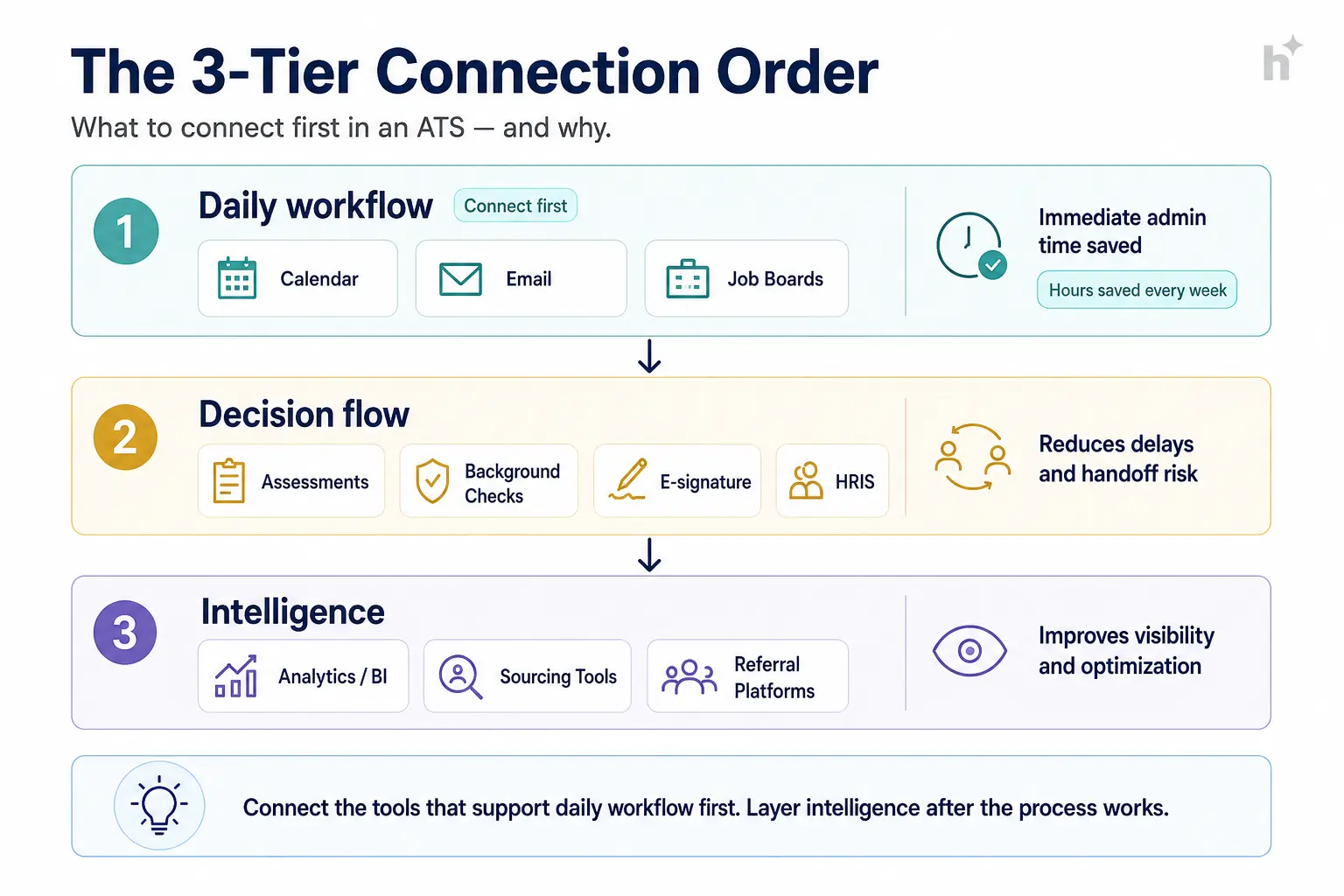
- Connect ATS integrations in three tiers: daily-workflow tools first (calendar, email, job boards), decision-flow tools second (assessments, background checks, e-signature, HRIS), intelligence tools third (analytics, sourcing).
- Calendar and email integration alone typically recovers 5 to 8 recruiter hours per week, making it the highest-ROI connection in the stack.
- “Integration” on a partners page can mean anything from real-time bidirectional sync to a nightly one-way CSV. Always verify at field level: which fields, which direction, how often, and what happens on failure.
- The ATS-to-HRIS connection eliminates the most error-prone manual handoff in HR: re-keying a new hire’s data, where a single typo can delay payroll or equipment.
- Test every integration with live scenarios before trusting it, and monitor sync health monthly. Silent failures, not missing connectors, cause most integration damage.
What Are ATS Integrations?
ATS integrations are data connections between your applicant tracking system and other tools in your hiring and HR stack, letting candidate information, schedules, scores, and hire data flow automatically instead of being re-typed.
The useful mental model is hub and spoke. The ATS is the system of record for everything pre-offer; integrations are the spokes that let it exchange data with calendars, email, job boards, assessment platforms, background check providers, e-signature tools, your HRIS, and analytics layers.
Not all spokes are built alike, and the vocabulary matters when you evaluate them:
Bidirectional sync: data flows both ways: the ATS pushes an interview to the calendar, and a declined invite flows back to trigger rescheduling.Webhook / real-time sync: changes propagate within seconds, versus nightly batch jobs where today’s update arrives tomorrow.Field-level mapping: the explicit list of which fields sync where: the difference between “candidate synced” and “candidate synced, but without phone number or salary band.”Native integration: built and supported by the vendors themselves, versus middleware (Zapier-style) or one-off custom API work.
A partners-page logo tells you none of this. The field map does.
Why ATS Integrations Matter
Integrations matter because disconnected systems tax every hire twice: once in recruiter hours spent re-typing data, and again in errors and delays that surface at the worst moments, like a mis-keyed start date hitting payroll.
Count the handoffs in one hire. A job posts to five boards. Applications flow back. Interviews get scheduled across four calendars. An assessment goes out and a score comes back. A background check runs. An offer goes for e-signature. The signed hire moves to the HRIS for payroll and provisioning. That’s seven system boundaries, and every unconnected one is manual work plus error surface.
The error side is what stings. Re-keyed data has a typo rate that compounds with volume, and the expensive typos cluster at the end: a wrong start date delays payroll, a missed salary band triggers an awkward correction, a dropped equipment request leaves a new hire laptopless on day one. The ATS-to-HRIS connection exists to make that whole class of error structurally impossible.
The honest caveat: integrations have a maintenance cost. APIs change, tokens expire, and a connector that worked in March can silently stop in June. Connected stacks need monitoring, which is cheap, but not zero.
📊 Key Stat: Stack surveys consistently find recruiters at disconnected companies losing 10+ hours weekly to manual data transfer between systems, roughly a quarter of a working week spent being human middleware.
Key Benefits of a Connected Stack
The primary benefit is recovered time and eliminated re-entry: a properly connected ATS saves 5 to 10 recruiter hours weekly and removes the manual handoffs where hiring errors concentrate.
Scheduling that runs itself. Calendar integration turns 4-email scheduling threads into one self-serve link with real-time availability. This is the single biggest time win in the stack.
One posting, every board. Job board integration posts once and syndicates everywhere, with applications flowing back tagged by source, which is also what makes source-of-hire reporting real instead of guesswork.
Assessment and screening results in context. Scores land on the candidate record automatically, so recruiters compare candidates in one screen instead of tab-hopping across platforms.
Clean hire handoff. The HRIS integration moves the signed hire, compensation, start date, manager, documents, without re-keying. Onboarding starts on time and payroll is right the first time.
Trustworthy funnel data. When every stage transition happens in connected systems, your metrics (time to fill, conversion, source effectiveness) stop having gaps where the spreadsheets used to be.
| Connection | Manual Reality | Integrated Reality |
|---|---|---|
| Calendar/email | 4+ emails per interview, 2 to 4 day lag | Self-serve link, booked in minutes |
| Job boards | Post 5 times, reconcile sources by hand | Post once, sources auto-tagged |
| Assessments | Export scores, paste into notes | Scores on the candidate record |
| Background checks | Portal-hopping, status chasing | Ordered and tracked from the ATS |
| HRIS | Re-key every hire, fix the typos later | One-click handoff, validated fields |
💡 Pro Tip: If you can only set up one integration this quarter, make it calendar plus email. It’s the fastest to deploy, the least risky, and recruiters feel the benefit the same week, which buys you goodwill for the harder connections.
How ATS Integrations Work: The 3-Tier Connection Order
Connect in three tiers ordered by workflow impact: daily-workflow tools first (calendar, email, job boards), decision-flow tools second (assessments, checks, e-signature, HRIS), and intelligence tools third (analytics, sourcing).
Tier 1: Daily Workflow (Connect First)
Input: Calendar (Google/Microsoft), email, and your job boards.
Process: These integrations run dozens of times daily per recruiter. Calendar sync enables self-serve scheduling and automatic rebooking on declines. Email sync logs candidate correspondence to the record. Board integrations syndicate postings and return source-tagged applications.
Output: 5 to 10 recruiter hours back weekly, and the workflow wins that fund the rest of the project politically.
Tier 2: Decision Flow (Connect Second)
Input: Assessment platforms, background check providers, e-signature, and the HRIS.
Process: These run once or twice per candidate but carry the highest-stakes data. Assessments trigger from stage changes and return scores to the record. Checks are ordered post-offer with status tracked in-system. Signed offers flow to the HRIS with field-level validation on the hire record.
Output: No re-keyed hires, no portal-hopping, and a complete audit trail from application to day one.
Tier 3: Intelligence (Connect Third)
Input: BI/analytics tools, sourcing platforms, referral systems.
Process: These consume ATS data rather than drive daily work: funnel data flows to dashboards, sourcing tools push candidates in with source attribution, referral platforms sync status back to employees.
Output: Reporting and pipeline intelligence on top of a stack that already works.
| Tier | Systems | Frequency of Use | Connect When |
|---|---|---|---|
| 1: Daily workflow | Calendar, email, job boards | Dozens of times daily | At or before go-live |
| 2: Decision flow | Assessments, checks, e-sign, HRIS | Per candidate/hire | First 60 days |
| 3: Intelligence | Analytics, sourcing, referrals | Continuous background | First quarter |
Best Practices for Integration Setup
The single most impactful practice is verifying every integration at field level before relying on it: which fields, which direction, what frequency, and what happens when sync fails.
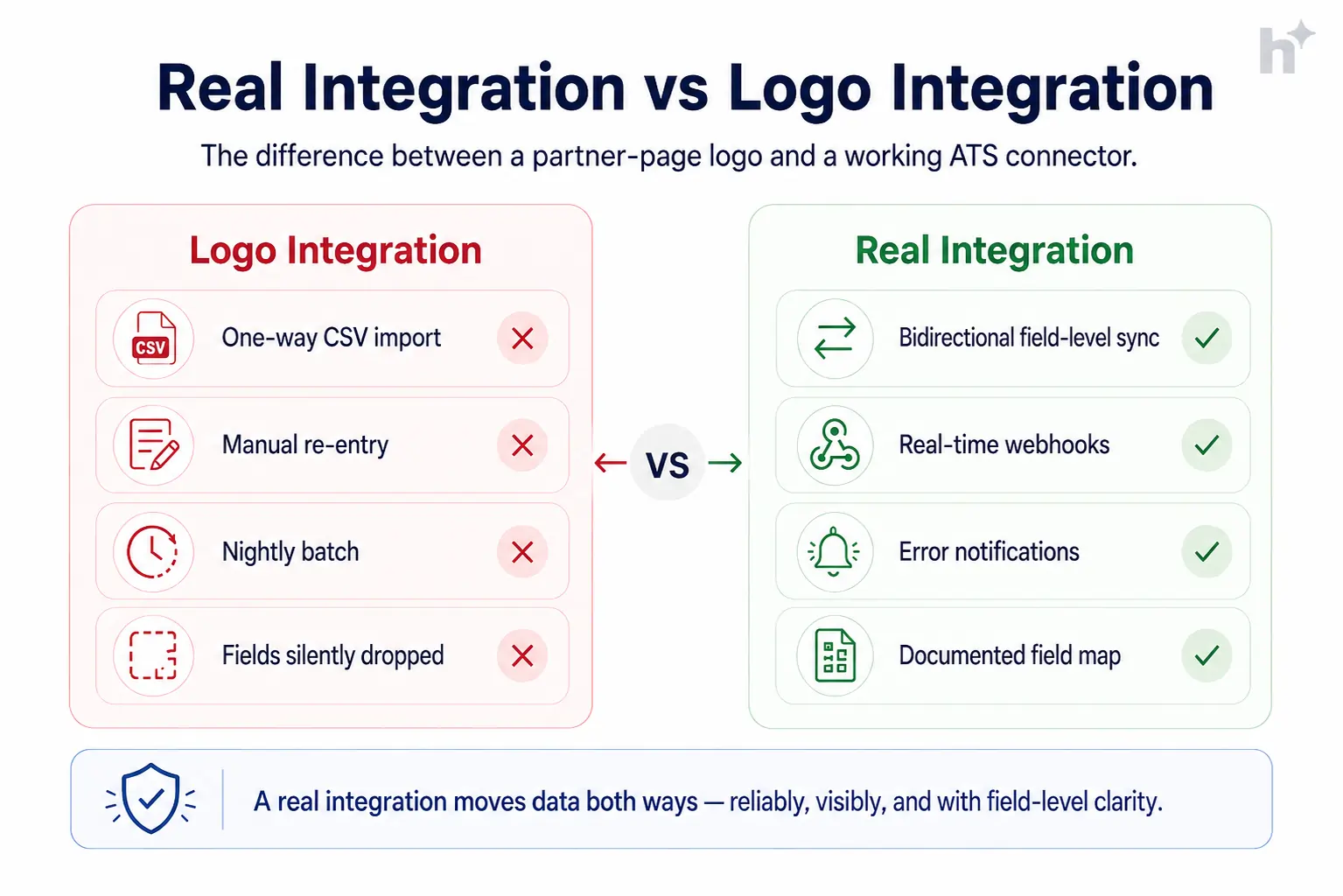
Demand the field map. Before: “we integrate with your HRIS” turns out to mean name and email, one way, nightly. After: a documented field-level map reviewed before setup; gaps are known and handled rather than discovered at the first hire.
Test with live scenarios, not green checkmarks. Before: the connector shows “connected” and everyone moves on. After: you run real scenarios end to end: decline an interview slot and watch the rebook, hire a test candidate and inspect every field that lands in the HRIS. Connection status and correctness are different facts.
Set up failure alerts on day one. Before: a token expires in June and three weeks of assessments never reach candidate records. After: sync-failure notifications route to a named owner, and the monthly health check reviews error logs. Silent failure is the expensive kind.
Prefer native, accept middleware, document custom. Before: a contractor’s custom API script is load-bearing and undocumented when they leave. After: native connectors where they exist, middleware for the long tail, and any custom work documented with an owner.
Assign each integration an owner. Before: everyone assumes someone watches the HRIS sync; nobody does. After: every connection has a named owner and a monthly 10-minute health review.
| Condition | Recommended Action | Expected Outcome |
|---|---|---|
| New ATS going live | Tier 1 connected and tested before launch | Day-one workflow wins |
| HRIS handoff is manual today | Prioritize HRIS in first 60 days, field-validate | Payroll-impacting errors eliminated |
| Vendor offers only CSV import/export | Treat as no integration; weigh middleware | No surprise swivel-chair work |
| Custom API work required | Document field map + owner + runbook | Survives staff turnover |
⚠️ Watch Out: The most damaging integration failure isn’t the connector that breaks loudly. It’s the one that keeps syncing 9 of 10 fields and silently drops the tenth. Field-level validation at setup and monthly spot checks are the only defense.
Common Challenges and How to Solve Them
The most common challenge is the gap between the partners-page promise and the field-level reality of what a connector actually syncs.
Challenge: The Logo Integration
The vendor lists your HRIS as a partner; the connector turns out to be a one-way nightly export of four fields. Solution: request the field map and sync specs in writing during evaluation, and make Tier 1 and HRIS depth a contractual requirement, not a hope.
Challenge: Token and API Drift
Integrations that worked at setup silently die when credentials expire or an API version sunsets. Solution: failure alerts to a named owner, a monthly health check, and calendar reminders ahead of known credential expiries.
Challenge: Duplicate and Conflicting Records
Two systems both think they own the candidate, and sync loops create duplicates or overwrite fresh data with stale. Solution: declare a system of record per data type (ATS owns pre-offer, HRIS owns post-hire), and configure sync direction to match.
Challenge: Compliance Data Crossing Boundaries
Background check results and assessment scores carry handling obligations that don’t disappear in transit. Solution: map which sensitive fields flow where, restrict them to need-to-know permissions on both sides, and include integrations in your data protection reviews.
Real-World Use Cases
Integration projects pay back fastest on scheduling and most decisively on the HRIS handoff, with measurable gains inside a quarter.
Professional services firm, 180 hires/year. Problem: scheduling consumed entire afternoons: 4 interviewers per panel across 3 offices, coordinated by email. Intervention: calendar integration with self-serve candidate booking and automatic panel availability resolution. Measured outcome: scheduling cycle dropped from 3.2 days to 6 hours, and coordinators redeployed roughly 12 hours weekly to candidate care.
Retail group, seasonal surges. Problem: posting each seasonal role to 6 boards manually, with source data reconstructed in spreadsheets at quarter end. Intervention: board syndication integration with source auto-tagging. Measured outcome: posting time per role fell from 90 minutes to 8, and the first reliable source-of-hire report moved 30% of board spend to channels that actually produced hires.
Fintech, 90 hires/year, strict onboarding SLAs. Problem: offer-to-HRIS re-keying caused errors in 1 of every 14 hires: wrong start dates, missing equity fields, delayed equipment. Intervention: ATS-to-HRIS integration with field-level validation and a required-fields gate before handoff. Measured outcome: handoff errors went to zero over two quarters, and day-one readiness hit 100% for the first time.
💡 Pro Tip: The fintech case shows the pattern for Tier 2 value: it’s not about hours saved, it’s about a class of error eliminated. Count both when you build the business case.
Metrics to Track Integration Health
The most important integration metric is sync error rate per connection, because silent failures are the way integrations actually hurt you.
Sync error rate. Definition: failed or partial syncs per connection; the core health measure. Calculation: errors ÷ sync events, from connector logs, monthly per integration. Target benchmark: under 1% with alerts on every failure; investigate any upward trend.
Manual re-entry hours. Definition: recruiter time still spent moving data by hand; the gap-finder. Calculation: quarterly 1-week time sample per recruiter. Target benchmark: under 2 hours weekly; more means a missing or broken connection worth naming.
Scheduling cycle time. Definition: decision-to-confirmed-interview hours; the Tier 1 payoff metric. Calculation: timestamp delta, monthly average. Target benchmark: under 24 hours with calendar integration live.
Hire handoff accuracy. Definition: share of hires reaching the HRIS with zero field corrections; the Tier 2 payoff metric. Calculation: corrected hires ÷ total hires, monthly. Target benchmark: 99%+; every correction is a field-map or validation gap.
Source attribution coverage. Definition: share of applications with automatic source tags; what makes channel ROI real. Calculation: auto-tagged ÷ total applications. Target benchmark: 95%+ with board and sourcing integrations live.
| Metric | What It Measures | How to Calculate | Target Benchmark |
|---|---|---|---|
| Sync error rate | Connection health | Errors ÷ sync events monthly | < 1%, alerted |
| Manual re-entry hours | Integration gaps | Quarterly time sample | < 2 hrs/week |
| Scheduling cycle | Tier 1 payoff | Decision-to-confirmed hours | < 24 hours |
| Handoff accuracy | Tier 2 payoff | Error-free hires ÷ hires | 99%+ |
| Source coverage | Data quality | Auto-tagged ÷ applications | 95%+ |
Risks and Pitfalls
The highest-severity risk is silent partial failure: a connection that looks healthy while dropping fields or batches, corrupting decisions downstream for weeks before anyone notices.
Silent partial sync. Nine fields flow, the tenth doesn’t, and offer letters go out with stale salary bands. Mitigation: field-level validation at setup, monthly spot checks, alerts on anomalies.
Sensitive data sprawl. Assessment scores and check results replicating into systems with looser permissions. Mitigation: a data-flow map for sensitive fields, need-to-know permissions on both ends, integrations included in privacy reviews.
Middleware fragility. A chain of no-code automations nobody documented becomes core infrastructure. Mitigation: middleware for convenience, never for payroll-touching flows; document and own everything custom.
Vendor API churn. A connector you depend on deprecates with 90 days’ notice. Mitigation: prefer vendors with versioned, documented APIs and published deprecation policies; keep a manual fallback runbook for Tier 2 flows.
⚠️ Watch Out: Never let a payroll-affecting data flow run through an unmonitored connector. The HRIS handoff earns validation gates and alerts before it earns your trust.
Future Trends
ATS integrations are moving from batch connectors toward real-time, standards-based, and increasingly agent-driven data flows.
Standards maturing. HR Open Standards and richer vendor APIs are slowly replacing bespoke field mappings, which means faster setup and fewer silent mismatches. Ask vendors about standards support; it’s a proxy for integration seriousness.
Real-time as default. Webhook-based sync is displacing nightly batches across the category. The practical effect: stale-data errors shrink, and integration health becomes observable in minutes rather than mornings.
Agent-driven orchestration. AI agents are starting to operate across systems, scheduling, ordering checks, updating records, through the same APIs integrations use. Stacks with clean, documented integrations will absorb these capabilities first; stacks held together by CSV exports won’t.
Frequently Asked Questions
Which ATS integrations should we set up first?
Calendar and email first, job boards second, both before or at go-live. They’re used dozens of times daily and recover 5 to 10 recruiter hours weekly. Then connect decision-flow tools (assessments, background checks, e-signature, HRIS) in the first 60 days, and analytics in the first quarter.
What does bidirectional sync mean in ATS integrations?
Data flows both directions: the ATS pushes an interview to a calendar, and a declined invite flows back to trigger rescheduling automatically. Many advertised integrations are one-way only, which leaves half the workflow manual. Always confirm direction field by field, not connector by connector.
How do you connect an ATS to an HRIS?
Through a native connector where both vendors support one, or middleware where they don’t. The work that matters is field mapping: define which fields transfer on hire (compensation, start date, manager, documents), set validation rules so incomplete records can’t hand off, and test with a dummy hire before trusting it with a real one.
Why do ATS integrations break?
Expired credentials and API version changes cause most breakage, and the failures are usually silent: the connector keeps running while a field or batch quietly drops. Failure alerts routed to a named owner and a monthly health check catch problems in days instead of quarters.
Are middleware tools like Zapier good enough for ATS integrations?
For convenience flows, notifications, simple updates, low-stakes tools, yes, and they cover the long tail well. For payroll-touching or compliance-sensitive flows like the HRIS handoff and background checks, prefer native or properly built API integrations with validation and monitoring. Fragile automation in high-stakes paths is technical debt with a payroll deadline.
How many integrations does a typical hiring stack need?
Most mid-market teams run 6 to 10: calendar, email, 2 to 4 job boards, an assessment platform, a background check provider, e-signature, and the HRIS. More isn’t better: every connection is a small maintenance obligation, so connect what removes manual work and skip what just adds logos.
Conclusion
ATS integrations are the difference between a system of record and a system of re-entry. Connect in tiers, daily workflow first, decision flow second, intelligence third, verify everything at field level, and give every connection an owner and an alert.
The tradeoff to respect: every integration is leverage and a small liability at once. The teams that win take the leverage on connections that remove real work, monitor them like the infrastructure they are, and skip the logo-collecting.
If you’re building a connected hiring stack, see how hiremore AI handles ATS integrations: native calendar and email sync, board syndication, and validated HRIS handoffs, with the field maps documented before you ask. That last part shouldn’t be rare, but it is.
Ready to hire smarter?
Turn hiring insights into faster shortlists with hiremore AI.
Build structured pipelines, screen candidates with AI, and keep your team aligned from first application to final offer.