



Recruitment Automation in 2026: What to Automate First (Step-by-Step Guide)
Most recruiting teams are doing work that software could do in seconds. Posting jobs to 15 boards manually. Sending the same acknowledgement email 200 times. Chasing hiring managers to confirm interview slots. None of that requires human judgment — but it consumes hours of recruiter time that could go toward conversations that actually require it.
Recruitment automation solves this by handling repetitive, rules-based hiring tasks using software — allowing recruiters to focus on decision-making and candidate relationships.
When implemented correctly, recruitment automation can:
- Reduce time-to-hire by 30–50%
- Improve candidate experience
- Increase recruiter productivity without hiring more staff
This guide is for HR leaders and recruitment ops teams ready to start automating. It covers what to automate first, how the technology works, and the pitfalls that sink most implementations before they gain traction.
What Is Recruitment Automation?
Recruitment automation uses software to handle repetitive, rules-based tasks across the hiring workflow — job posting, application tracking, interview scheduling, and candidate communications — without requiring manual recruiter input for each action.
The label covers a wide spectrum. At one end, it's a single integration: your ATS auto-sends an acknowledgement email when a candidate applies. At the other end, it's a fully connected hiring pipeline where a job req approval triggers automatic posting across 20 boards, applications flow into a ranked shortlist, and shortlisted candidates self-schedule interviews — all before a recruiter touches the record.
What recruitment automation is not: a replacement for recruiter judgment at decision points. The technology handles the logistics. Humans still decide who gets hired.
The core components are an applicant tracking system (ATS) as the central data layer, workflow automation rules that trigger actions based on candidate status, and integration with job boards, calendar tools, and communication platforms. hiremore AI sits in this stack as the AI layer — handling screening, ranking, and structured assessment between application intake and human review.
Why It Matters
Without automation, recruiters spend roughly 60% of their time on administrative tasks that don't require their expertise — leaving less than half their day for the work that actually influences hiring outcomes.
SHRM research shows that recruiters spend an average of 13 hours per week on tasks that are directly automatable: posting jobs, sending status updates, scheduling interviews, and moving candidates between pipeline stages. At 50 working weeks a year, that's over 30 full days of capacity per recruiter that automation can reclaim.
The volume problem. A growing company with 30 open roles receiving 80 applications each is processing 2,400 applications. Manual review at even 3 minutes per application is 120 hours — three full working weeks — before anyone has spoken to a candidate. Automation collapses that gap.
The consistency problem. Manual processes produce inconsistent outcomes. The same candidate gets a different experience depending on which recruiter handles them, which day they applied, and how busy the team is. Automation applies the same rules to everyone.
The speed problem. Top candidates are off the market in 10 days on average (LinkedIn, 2026). Every day a strong applicant spends waiting for an acknowledgement, a screen, or an interview slot is a day they might accept another offer. Automation compresses the timeline.
Key Benefits
The four core benefits of recruitment automation are faster time-to-hire, consistent candidate experience, better use of recruiter capacity, and a documented, auditable hiring process.
Time-to-hire compression. Automated screening and scheduling removes the two biggest calendar bottlenecks in a typical hiring pipeline. Companies implementing end-to-end automation report 30–50% reductions in time-to-hire for high-volume roles.
Consistent candidate experience. Every applicant gets timely acknowledgement, clear status updates, and a structured process — regardless of how busy the team is. Candidate experience scores improve when communications stop depending on recruiter bandwidth.
Recruiter capacity reallocation. When automation handles sourcing distribution, application sorting, and interview coordination, recruiters move their time to offer negotiation, stakeholder management, and the human conversations that change hiring outcomes.
Process documentation by default. Automated workflows create an audit trail. Every action — when an email was sent, when a stage changed, when a candidate was rejected — is logged. That matters for compliance, reporting, and continuous improvement.
Teams using recruitment automation report saving an average of 13 recruiter-hours per week per open role — equivalent to reclaiming 30+ working days per recruiter annually. (SHRM, 2024)
How It Works
Recruitment automation works as a connected layer over your existing hiring stack — triggers fire based on candidate status changes, rules determine the action, and integrations execute it across job boards, calendars, and communication tools.
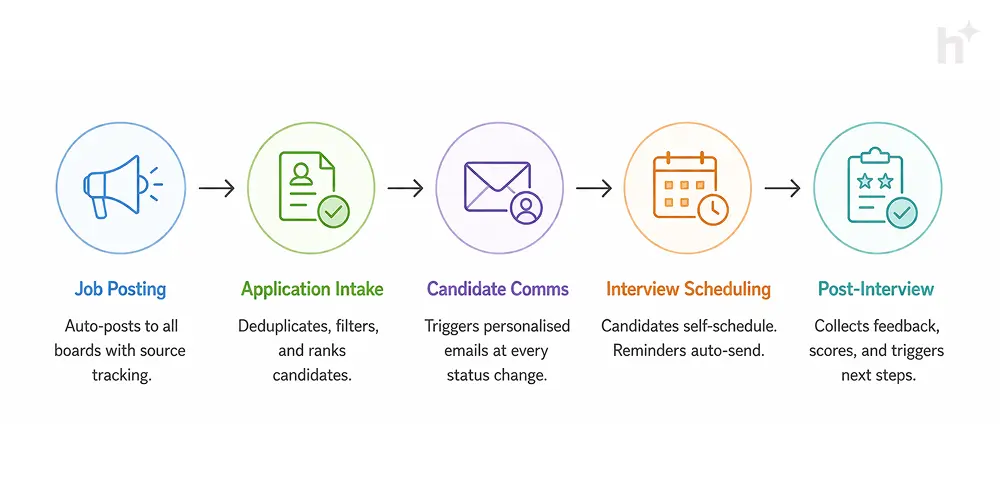
Stage 1: Job Requisition and Posting
- Input: Approved job req with role details, target boards, budget
- Process: The automation layer pulls req data and distributes the posting to configured job boards (Indeed, LinkedIn, specialist boards) simultaneously. Some platforms also trigger internal notifications to the hiring manager and sourcing team.
- Output: Active listings across all target channels within minutes, with links tracked back to source for attribution reporting.
Stage 2: Application Intake and Sorting
- Input: Incoming applications from all sources, flowing into the ATS
- Process: The ATS consolidates applications regardless of source. Automation rules apply initial filters (minimum criteria, duplicates, ineligible geographies). AI screening layers can then rank remaining candidates against role criteria.
- Output: A deduplicated, filtered, and optionally ranked candidate pool — ready for human review or the next automated stage.
Stage 3: Candidate Communication
- Input: Candidate status change (applied, screened, shortlisted, rejected)
- Process: Status change triggers a personalised email or SMS. Templates are configured per stage. No recruiter action required for routine communications.
- Output: Timely, on-brand communication to every candidate at every stage — without manual effort.
Build rejection communications with the same care as interview invitations. A well-worded automated rejection preserves your employer brand far better than silence or a 3-week delay.
Stage 4: Interview Scheduling
- Input: Shortlisted candidate, recruiter/hiring manager calendar availability
- Process: Candidate receives a self-scheduling link showing real availability slots. They select a time. Calendar invites auto-generate for all parties. Reminders fire 24 hours before.
- Output: Confirmed interviews with zero recruiter scheduling overhead. No email chains.
Stage 5: Post-Interview Workflow
- Input: Interview completed, interviewer feedback submitted
- Process: Automation routes feedback collection to interviewers, consolidates scores, and triggers the next pipeline action — advance, hold, or reject — based on configurable rules and recruiter sign-off.
- Output: Structured feedback on record, next-stage action taken promptly, candidate notified.
Best Practices
Document your existing process before touching automation. The most common implementation failure is automating an undocumented, inconsistent workflow — which produces automated inconsistency at scale.
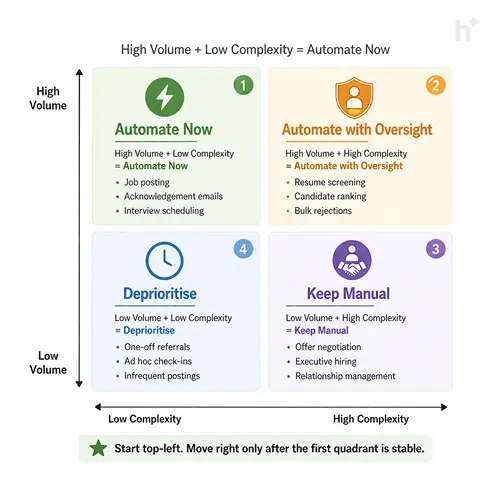
Map your current process before automating anything. Write out every step from job req approval to offer signed. Identify where time is actually lost and where human judgment is genuinely required. Only automate the steps where the logic is clear and consistent.
- Before: Team automates ad hoc based on tool capabilities. Three recruiters use different templates. Results are inconsistent.
- After: Process mapped, agreed, and documented first. Automation implements the agreed process. Every candidate gets the same experience.
Start with the highest-volume, lowest-complexity tasks. Job posting syndication, application acknowledgement emails, and interview scheduling are the right first automations. They're high-frequency, rules-based, and carry low risk if something goes wrong.
- Before: Team spends 45 minutes posting each new role across boards. Two roles per week = 90 minutes gone.
- After: Posting automated via ATS integration. Same two roles posted in under 5 minutes. 85 minutes reclaimed weekly.
Keep humans in the loop at decision points. Automation should accelerate the pipeline, not make decisions. Shortlisting, rejection, and offer approval should require explicit recruiter sign-off, not trigger automatically from a score threshold.
Audit your automations quarterly. Check that triggered emails are still accurate, that job board integrations are posting correctly, and that scheduling rules reflect current availability. Broken automations that nobody notices are worse than manual processes.
Never automate rejection communications for senior or niche roles without a human review step. An automated rejection to a strong passive candidate who was moving slowly through the process is a permanently burned bridge.
Common Challenges
The most common failure isn't a technology problem — it's implementing automation on a process that was never properly defined, then wondering why the output is inconsistent.
Automating a Broken Process
If your manual screening criteria are vague, your automated screening will produce vague results faster. Automation amplifies whatever process logic you give it. The fix is always process-first, technology-second. Define the rules clearly before the software applies them.
Poor Candidate Experience at Automated Touchpoints
Candidates can tell when a communication is templated. The problem isn't automation — it's lazy templates. Generic, impersonal automated emails are a candidate experience liability. Fix: invest time in writing templates that sound human, use the candidate's name, reference the specific role, and give clear next steps.
Integration Failures Between Tools
Most recruiting automation requires multiple tools to talk to each other — ATS, job boards, calendar, communication platform. Integration breaks are the most common technical failure. Fix: use platforms with native integrations rather than custom API builds where possible, and monitor integration health as part of your regular operations review.
Over-Automation of the Candidate Journey
Not every touchpoint should be automated. A candidate who makes it to final rounds deserves a human conversation, not another triggered email. Fix: map your candidate journey and explicitly mark which touchpoints are human-only. Use automation to handle logistics; use people to handle relationships.
The biggest signal that your automation is hurting rather than helping: candidate drop-off rates increasing after you deploy. If more candidates are ghosting or withdrawing after automated touchpoints go live, your templates or timing are wrong.
Real-World Use Cases
Recruitment automation delivers the clearest ROI in three scenarios — high-volume seasonal hiring, multi-role campaigns across geographies, and growing companies that need to scale recruiting without scaling headcount.
Retail — Peak Season Hiring. A national retail chain needed to hire 600 store associates across 80 locations in 8 weeks for the holiday season. Without automation, this required a temporary recruiting agency at significant cost. Using automated job posting, AI-based application screening, and self-scheduling for interviews, they ran the entire first-pass process in-house. Time-to-hire dropped from 18 days to 7 days. Cost-per-hire fell 34% compared to the prior season's agency model.
Tech Scale-Up — Multi-Role Campaign. A 300-person SaaS company running 25 simultaneous open roles had two in-house recruiters. Manual coordination was creating bottlenecks and candidate complaints about slow response times. After implementing ATS automation for communications and scheduling, average time-to-first-response dropped from 4.2 days to same-day. Candidate satisfaction scores (measured via post-process survey) improved from 3.1 to 4.4 out of 5.
Healthcare Staffing — Compliance-Heavy Hiring. A healthcare staffing firm managing placements across 8 states needed consistent documentation of every candidate touchpoint for compliance purposes. Manual record-keeping was creating audit risk. Automated workflow logging gave them a complete, timestamped record of every stage change, communication, and decision. Their next compliance audit passed without a single documentation finding.
The retail case delivered the most measurable ROI: 34% lower cost-per-hire, time-to-hire cut by more than half, and zero agency dependency during peak season. That's what full-funnel automation looks like when it's implemented on a well-defined process.
Metrics to Track
Time-to-hire and cost-per-hire are the headline metrics, but the most actionable signal for automation performance is stage-by-stage conversion rate — it tells you exactly where your pipeline is leaking.
Time-to-hire broken down by stage is more useful than the headline number. If overall time-to-hire improves but stage 3 (interview scheduling) is still slow, your calendar integration isn't working as intended.
Automation error rate is a metric most teams don't track but should. A broken trigger that sends the wrong email to the wrong candidate at the wrong time is a candidate experience incident — and a compliance risk if it's a rejection.
Risks and Pitfalls
The highest-severity risk isn't technical failure — it's deploying automated screening or rejection workflows that systematically disadvantage protected groups, with no human in the loop to catch the pattern.
Automated screening bias. If your screening rules are built from historical hire data that reflects past biases, your automation will apply those biases at scale, consistently, to every applicant. Unlike a biased human decision that varies, a biased automation rule never has an off day. Regular adverse impact analysis is non-negotiable.
Template fatigue and candidate drop-off. Over-communicating via automation — too many emails, too frequent, too generic — trains candidates to ignore your messages. When your interview invitation gets filtered with the acknowledgement spam, you've lost a good candidate to your own process.
Vendor dependency. Heavy reliance on a single recruitment automation platform creates switching risk. If pricing changes, the platform sunsets a feature you depend on, or an integration breaks, your entire hiring pipeline is affected. Build processes that are platform-agnostic where possible.
False sense of compliance. Automated audit trails are a compliance tool, not a compliance guarantee. Having a log of what the system did is only useful if what the system did was legally defensible in the first place.
If your ATS vendor can't explain how their screening algorithms handle adverse impact analysis, that's a risk you're carrying on their behalf. Ask the question before signing a contract, not during a legal challenge.
Future Trends
The near-term direction is toward predictive automation — systems that don't just execute rules but anticipate bottlenecks, flag pipeline risks, and suggest process adjustments before problems compound.
AI-driven pipeline forecasting. Recruitment automation platforms are adding predictive layers that flag when a role is at risk of missing its hire date — based on application volume, stage conversion rates, and historical patterns. This shifts automation from reactive to proactive.
Conversational AI in candidate communications. Automated emails are giving way to AI-powered chat interfaces that handle candidate questions, collect information, and update pipeline status in real time — without a recruiter writing every response. Early deployments show 25–30% higher engagement rates than static email sequences.
Skills-based automation routing. As hiring shifts toward skills-based criteria over credentials, automation systems are being built to route and screen based on demonstrated capability signals — portfolio links, assessment results, project history — rather than degree and title matching.
Tighter compliance tooling. Regulatory pressure (EU AI Act, proposed US EEOC AI hiring guidance) is driving recruitment automation vendors to build compliance documentation into their core product — not as an add-on. Audit logs, bias reports, and explainability features will become baseline expectations within 12–18 months.
Frequently Asked Questions
What parts of recruitment can actually be automated?
The tasks best suited for automation are rules-based and high-frequency: job posting to multiple boards, application acknowledgement emails, basic eligibility filtering, interview scheduling, status update communications, and feedback collection from interviewers. Tasks that require human judgment — assessing cultural fit, negotiating offers, building candidate relationships — should stay with your recruiters.
How long does it take to implement recruitment automation?
A basic automation stack (ATS with posting integration, automated communications, and self-scheduling) can be live in 4–6 weeks if your job board accounts and calendar tools are ready. A full end-to-end pipeline with AI screening, custom integrations, and multi-stage workflow logic typically takes 3–4 months to implement and calibrate properly.
Does recruitment automation work for small hiring teams?
Yes — and it often has a bigger proportional impact on small teams than large ones. A two-person recruiting team spending 30% of their time on scheduling and email management reclaims significant capacity relative to their total output. Start with scheduling automation and job posting syndication. Those two alone can return 5–8 hours per week per recruiter.
Can recruitment automation create legal risk?
Yes, if deployed without proper oversight. Automated screening that produces adverse impact against protected groups is a legal liability regardless of whether a human or an algorithm made the decision. Any automated step that influences who advances in a hiring process should be audited regularly for disparate impact and documented as part of your compliance record.
What's the difference between an ATS and recruitment automation?
An ATS (applicant tracking system) is the central database for your hiring data — it stores candidates, tracks their status, and manages pipeline stages. Recruitment automation is the workflow layer built on top of the ATS that triggers actions automatically based on status changes. Most modern ATS platforms include some automation capability, but standalone automation tools and AI layers (like hiremore AI) extend what's possible beyond native ATS features.
How do I know if my recruitment automation is working?
Track three numbers before and after implementation: time-to-hire, stage-by-stage conversion rate, and candidate response rate to automated communications. If time-to-hire drops, conversion rates are stable or improving, and candidates are engaging with your automated touchpoints, your automation is working. If response rates are falling or drop-off is increasing post-automation, your templates or timing need adjustment.
Conclusion
Recruitment automation isn't a technology decision — it's a process decision that technology enables. The teams that get the most from it are the ones who defined their hiring process clearly before touching a single integration, started with the highest-volume lowest-complexity tasks, and treated automation as a capacity multiplier rather than a recruiter replacement.
The real competition in hiring isn't between companies with automation and companies without it. It's between companies that automate a well-designed process and those that automate a broken one. Get the process right first, and the technology returns results from day one.
hiremore AI helps recruitment teams build the AI screening and ranking layer on top of their existing stack — so the shortlist your recruiters review is ranked, scored, and ready. Explore how it fits into your automation workflow.

Related Blogs

How AI is Reshaping Recruitment in 2025
Admin User Feb 19
In 2025, hiring isn't just about gut feeling, resumes, and interviews anymore. It's about data-backed decisions, real-time insights, and automated workflows - all powered by Artificial Intelligence (AI). The recruitment industry has witnessed a technological evolution in the last few years, but 2025 marks a turning point. With AI now embedded into every stage of the hiring process, recruiters are no longer spending time on repetitive tasks. They’re spending time on smart decisions. In this article, we break down exactly how AI is reshaping recruitment in 2025, what benefits it offers across industries, and how platforms like HireMore are enabling this transformation.

How to Create a Structured Interview Process that Improves Hiring Decisions
Admin User Feb 19
Hiring the right talent is one of the most critical decisions any organisation makes. A bad hire can cost far more than just salary - it can affect productivity, team morale, and even customer satisfaction. Yet, many hiring processes rely on unstructured interviews, where each interviewer asks different questions, evaluates candidates differently, and makes decisions based on subjective impressions. A structured interview process changes that. It creates a consistent framework for evaluating candidates, ensuring that decisions are based on role-specific skills, relevant experience, and cultural fit rather than gut feeling.

Top Interview Questions for Different Roles: A Recruiter’s Guide
Admin User Feb 19
Asking the right interview questions can make the difference between hiring someone who excels in the role and someone who struggles from day one. While generic questions like “Tell me about yourself” have their place, they rarely reveal the deeper insights you need to make a confident hiring decision. Role-specific interview questions help uncover a candidate’s true capabilities by targeting the skills, knowledge, and behaviours required for the position.